Showing posts with label pitching. Show all posts

Wednesday, April 26, 2023

Designer Diary: ALIEN: Fate of the Nostromo

 Happy ALIEN day! For this special day, I thought I'd share how the ALIEN: Fate of the Nostromo board game was created!

In spring of 2020, I was contacted by Ravensburger about their available licenses. I'm fortunate to be on a list of game creators that are offered the opportunity to pitch game ideas to the publisher. ALIEN was on the list and as I'm a big fan of the sci-fi thriller, I knew I had to give it my best shot!

 
I ended up pitching two concepts - one based on the 1979 movie and an original idea set in the ALIEN universe around the time of the original movie. Ravensburger's response to both concepts were positive - and they asked me if I could combine the two ideas: Take the game mechanics from the original idea's pitch but base the game on the setting of the original film. When I said that I could, I was asked for a more detailed example of the game. Grabbing some components from other games I had in my collection, I set to work putting together a prototype!


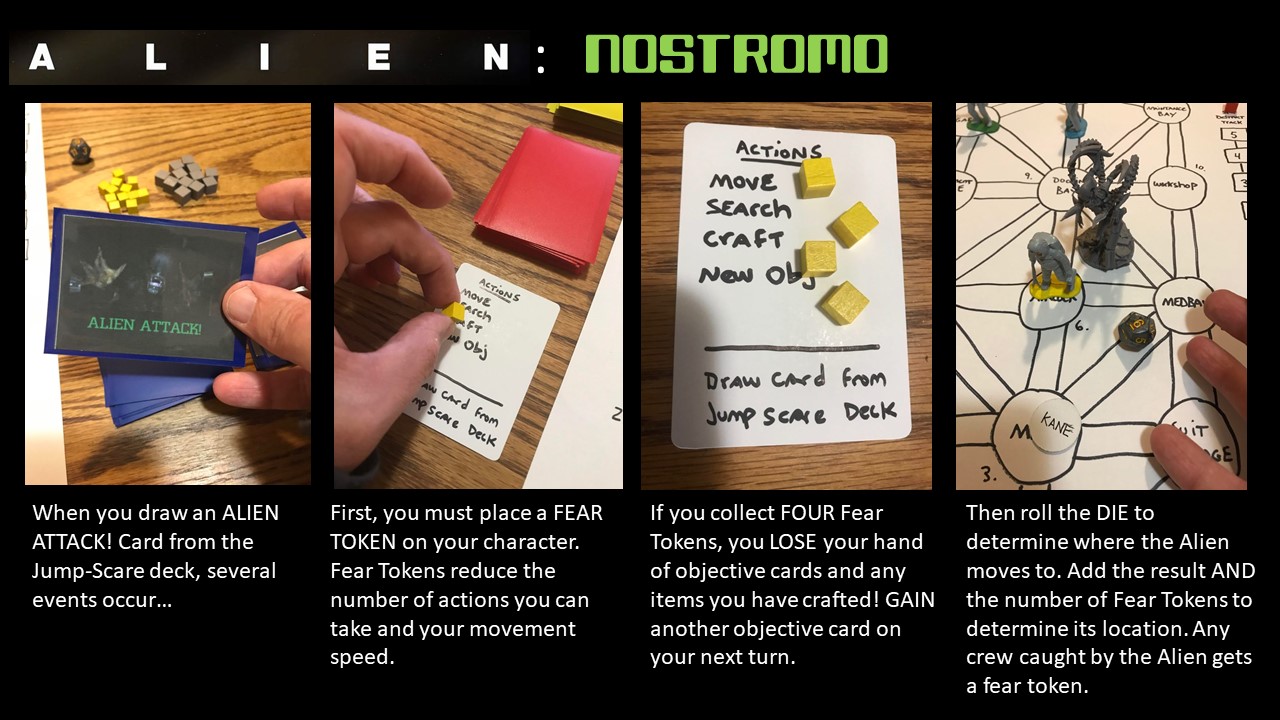
Ravensburger had a few requests for the design: they were excited about the "Jump scare" deck mentioned in the pitch, so I had to explain how that worked...


...and I was asked to not have player elimination or a traitor mechanic in the game design. I said "you do realize this is a movie with player elimination and a traitor mechanic, right?" They replied "You'll figure something out." So instead, I came up with a fear mechanic - the more frightened you got, the less you could do. If you were ever "too scared" to do anything, the game was over.


And of course, Jonesy had to make an appearance in the game. However, I didn't want him to be a player character or a first-player token. Instead, I wanted him to act as he did in the film - causing jump scares to the player and even being a source of frustration until the player could capture him in the cat-carrier.
 

Once all of the pieces were in place, my family playtested the game over and over and over again. This was one of the happy side-effects of the global pandemic - a captive playtesting group!
 
My family was a great help and my kids dubbed the ALIEN miniature "Alan" - enjoying making him "grab" the astronaut miniatures that were stand-in for the player characters. Note the "Ash" miniature stand-in that became a standee in the final game.


Meanwhile, Ravensburger's Steve Warner was leading the remote playtesting efforts on the game. They came up with some of the game's better improvements - turning the jump scare deck into tokens, and splitting the board into two "levels" of the ship.
 
 
This prototype image shows several ideas that were discarded including individual "fear" for each character, a die used to determine the Alien's location (which was meant to be in the shape of the classic egg) and a meter that increased the Alien's speed and lethal-ness as it increased. This is all part of the iterative design process - you try ideas, they either don't work or don't improve the game, so you come up with something else.

Another funny moment during development: I'm friends with sculptor Brian Dugas and we were DMing each other about what projects we were working on - without telling each other what projects we were working on. I deduced that he was working on the minis for ALIEN and said "Hey! I'm designing that game!" We both had a good laugh and I'm glad that Brian was on the project - he's super-talented and it's always great to work with friends.


Like I mentioned, the board was constantly changing as the game developed. These are just a few of the configurations we played with over the course of development. But, I'm pleased with what we ended up with - it follows the structure of the ship as seen in the movie but still allows for interesting movement and gameplay. Also, I love the little details - especially the "acid drip" that is on both levels of the ship map.


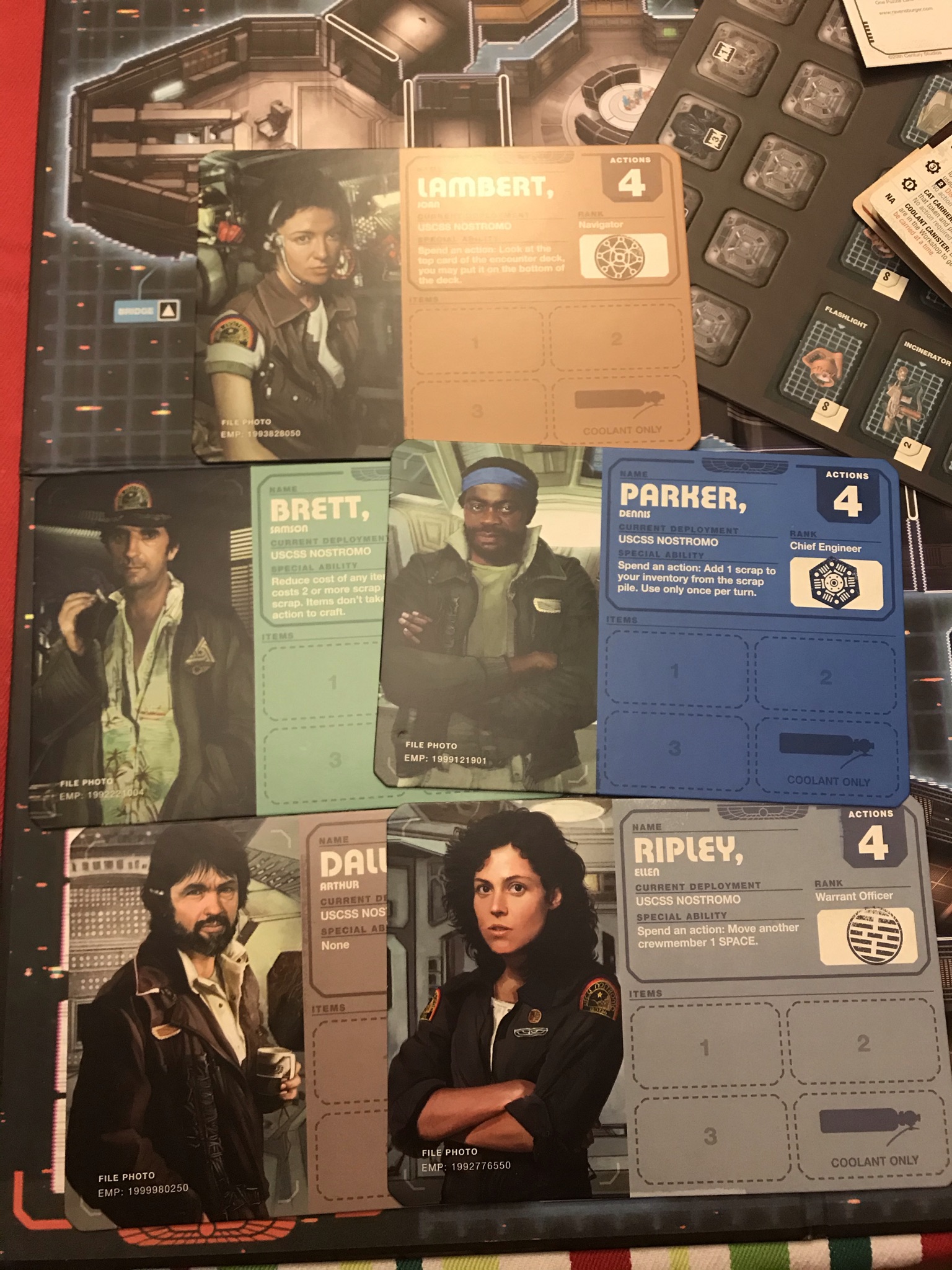
Another happy moment was when we learned we could use the likenesses of the actors. This isn't always the case - but having portraits and the other components painted by Stefen Koidl, Studio Hive and Vlad Rodriguez really made the game come alive.

The icing on the cake was the Jonesy "jump scare" that greets you when you open the box. I give full credit to Steve and Ravensburger for that one. It was a highlight of the production and a memorable moment for those who bought the game.

ALIEN: Fate of the Nostromo came out in the summer of 2021 and I couldn't be more proud to have designed the game!


Tuesday, September 22, 2020

Evolve your sell-sheet!

 I am currently taking part in The Pitch Project - a competition in which game designers present their sell-sheets in the hopes of getting some pitch meetings with an impressive list of name board game publishers including Hasbro, The OP, Arcane Wonders, Renegade Games, AEG, WizKids, Stonemeier Games, Spin Master and many more!

I've submitted three pitches (so far), but the best thing that has come out of the process is the message board where all of the game designers are giving each other valuable feedback on their sell-sheets! This spirit of cooperation is one of the many reasons why I love the board game design community!

After reading the feedback on my own sell-sheet, I decided to go back and take a look at the evolution of one as it has improved over time. Let's take a look at the sell-sheet for my game Castle Climbers.

The first sell-sheet I created for Castle Climbers used my 1st version of the prototype featuring my hand-drawn, water-colored artwork! Obviously, I wanted to show it off... as well as recreate the castle wall that appears in the game. Note the character climbing up the wall while being menaced by the guardians in the windows - a strong visual element from the game. I've already come up with an OK catchphrase "Building the castle is easy... staying on it is the hard part!" and there is a brief description of game play but I am missing several important things! First off, I'm missing the "3 essentials": Number of players, Age of players and Play time. These should be on every sell-sheet as they are the first clue to the prospective publisher how to market your game.

Also missing is a components list. This is a list of all of the "things in the box". This is also very important to publishers as it gives them an idea of how much your game will cost. If your component list has 100's of miniatures or handfuls of custom dice, the publisher might pass because of the cost to make it.

Also missing is a good image of the game in action. I realize now that the images of the individual tiles doesn't give the viewer a good idea of the game in play or even how to play the game!

Finally, while horizontal orientation is not taboo, it doesn't play to the strength of the game's design: climbing the castle.

In version two, I've re-oriented the sheet vertically to make it feel more like the character is climbing the castle. Most of the same mistakes have been repeated, but at least I've added the "3 Essentials" to the sell-sheet.

Version three was created after I commissioned my daughter Evelyn to create artwork for the game. I now show the box cover, an OK photo of the game in action, but I'm still trying to recreate the wall using the artwork. The "3 Essentials" now have icons to help draw the eye and I have a component list, a better description of the game play and... maybe most important of all, contact information so potential publishers know where to contact me! (as well as a snazzy Bedbug Games company logo)

Version 4 represents the game after I streamlined the components list for potential a Kickstarter. I decide to take a new photo and labeled each part of game play with white text. I still think it's a cute idea, but it's also too cluttered for clear reading. Note the list of game play mechanisms (tile laying, take that, etc.) up near the top of the sheet. I actually entered this sell-sheet into a festival competition and was told it didn't clearly explain how the game was played.

Version 5 is the result of that festival feedback. I have now broken out the game play into their own little pictures with the big image of the castle in the middle. I also swapped out the picture of the treasure chest with the guardian. People are usually more interested in looking at characters than things. I was quite pleased with this sell-sheet until someone pointed out that I had organized the steps of the game play going down rather than across. Note, my contact information has been removed as per the rules of the Pitch Project contest.


The current final version (6) takes into account that feedback, so I have numbered each of the game play "call-outs" running from left to right, traveling downwards. This way you still get a good look at the castle (I couldn't find a good way to make the reader's eyes go from bottom to top to imitate the climb) and the game play is clearly explained to the reader. I'm pretty pleased with this final version, especially when you consider what it started as!

UPDATE: So, I wanted more feedback so I turned to Reddit. And man, o' man, did I get it. Several people complained about the fonts. One person said "my title font looked like it was made in Windows 95" and another said they hated the font used for the text. And even though their feedback was... raw... I still think it made some good points. So, I adjusted it again.


 I created a new logo for the game (I was inspired by the Clash of Clans logo - which has the right amount of silliness and medieval-ness I was looking for) and I changed the text. I moved some of the elements around to give the pictures on the left and the text a little more room for readability. I also noticed that several of my fellow designers were putting a "Tested at ProtoSpiel" logo on their sell-sheets and since I had done extensive testing of the game at several San Jose ProtoSpiel events, I figured it couldn't hurt. 

And to be honest, even though the feedback was a little tough to swallow, I think the sell-sheet is even better than before!

Do you have any suggestions to how to make this sell-sheet better? Do you have any sell-sheets you'd like to share? Post them in the comments below!


Friday, July 31, 2020

Six Pointers for VIRTUALLY Pitching to Publishers


In a previous post, I listed Six Pointers to Pitching Games to Publishers. That list is so 2019! It's 2020, baby! Times have changed! Everything is VIRTUAL!

So, you can't go to conventions to pitch your games. That doesn't mean you can't pitch your games! You can still pitch them VIRTUALLY! I've already pitched several games via Zoom and other video conferencing systems and while it is a bit tricky, it can be done. Here are SIX pointers for VIRTUALLY pitching your game via video conferencing.


1. Create a landing page: As you prepare for your pitch or if you want to give the publisher a "take-away" about your game, go virtual! Create a web page or blog site for your board game that shows a few images of the game in action, write a short blurb describing what's cool and unique about your game and describes the game play, and don't forget to list out the "3 essentials" (Player count, Player age and Play Time). Or you can post your sell-sheet on the web page. If you can afford it, try to secure an URL with the name of your game as the address.

You can also list your game on boardgamegeek.com - which allows you to upload photos of the game, set all of the essentials and even list the types of mechanisms that compose the game. You can upload your rule book or even print and play files.


2. Make a video: In a recent panel at San Diego Comic Con, several game publishers said that the majority of the pitches they received recently were videos. This means that you are going to have to learn how to make a video if you want to pitch your game. Don't worry, making a video isn't as hard as you might think... as long as you are prepared.

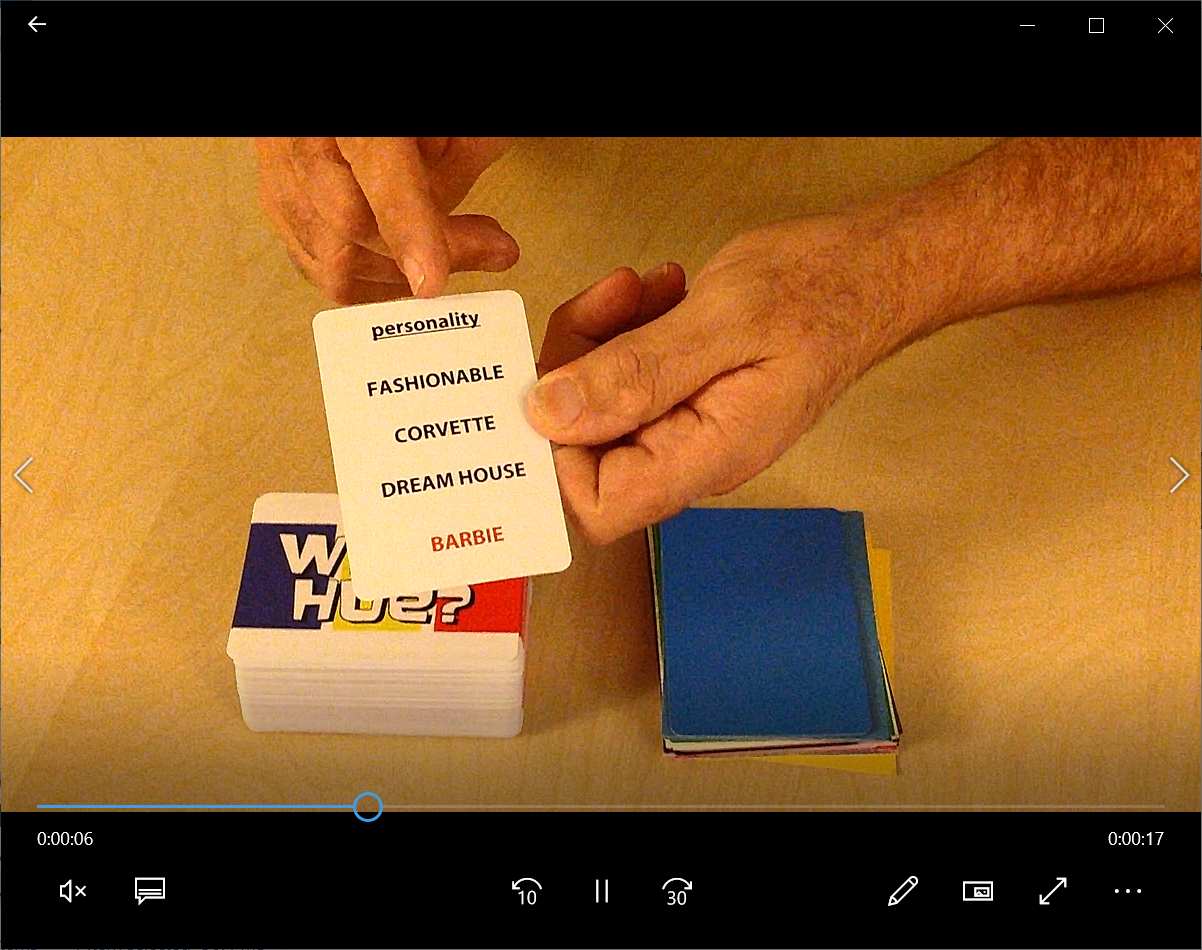
First, you need to know what to say! Play out what you are going to do. Place pieces within easy reach. "top deck" cards if you have to. Make the game play the way that you want it to. Once you've figured out your "spiel", it helps to practice it a few times first. If you aren't good at improvising, then I suggest writing a script. No one cares if you are reading from a script, just try to make your delivery natural sounding.

Then you need a camera. Unless you already have a digital camera, then great but a cell-phone camera works fine too. Many designers shoot the game from their point-of-view. That's fine as long as you can concentrate on what you are shooting and remember to focus on the game. Don't let the camera drift away from the table or components. If you find you are no good playing a game and filming at the same time, then try to get someone to help you. Just make sure they know what you are doing so you can choreograph the camera with whats going on in the game.

When shooting your game, keep it short (3 minutes or less) but take your time. Skip extraneous details like backstory and just focus on what the player does. If you are going to show of a card or component in the game, make sure you linger on it for a moment so the viewer can properly see it. (I usually give myself a "three count" while filming.) Make sure you go through the key points of the game including how many players, how long it takes and how to win the game.

If you can shoot the demo in one sitting, that's fine. If you can edit, then even better. I wouldn't get too fancy. As long as the sound is clear and legible, you don't need music or sound effects unless it is part of the game. Keep away from visual effects too. You are trying to simulate the experience of playing the game in person, not make some flashy Hollywood trailer!

Don't make the publisher have to download the video. It's best to upload your video to a host site such as YouTube or Vimeo or even link it to your BGG listing for the game. You can then easily send them the link to that site for review.


3. Learn Tabletop Simulator: Many game designers have created prototypes in Tabletop Simulator or Tabletopia to test their games during the pandemic. While this is a great way to get "real live" people to play your prototype, be aware that making the virtual prototype is lot of effort and can get very frustrating without help. I have been wrestling with Tabletop Simulator since the start of the pandemic and I finally feel like I know what I'm doing.

The documentation for TTS isn't great, the interface is un-intuitive and you have to prepare files like cards individually rather than by pages - which might be different than how you might prepare them for print and play or production. I also had some size issues when importing in models based on the polygon count and rotation of the model, but thanks to the help from a few tech-savvy friends, I was able to translate my board game Rayguns and Rocketships to TTS.

Right now, I've been using TTS over Tabletopia as I already own it (it costs $19.99 on Steam) and it seems to be what the majority of players are using. Some of the better TTS tutorials I've found online are here:

General features: https://www.youtube.com/watch?v=-MfuHyBoJGE
Helpful user short-cuts: https://www.youtube.com/watch?v=5cjWpm9kj-I
Making a prototype in TTS: https://www.youtube.com/watch?v=4AZwP4pKoP4 - Ludolodge has several other tutorials that are all quite good. Check them out!

If you know of other virtual prototyping programs, please list them in the comments!
4. Get a second camera: That camera that is installed into your laptop is great when you are Zooming with Mom, but it's a real hassle to use when trying to show off your game prototype. This is why I strongly recommend investing in a second camera. Most video conferencing programs allow you to switch between cameras.

If you set up your secondary camera ahead of time to show off your game, then it will be very easy for publishers to see your game. Or you can swoop it down close to show off the information on a card or some other component.

USB cameras are stupidly inexpensive right now. You can buy one on Amazon.com from $20 to $70 depending on quality and durability. Or you can do what I did, convert your Playstation's EyeToy camera into a USB one by downloading this free driver: https://download.cnet.com/EOCP-Driver-for-Sony-Eyetoy-USB-Camera/3000-2120_4-10532564.html

Just be aware that some video conferencing systems allow for easier switching of video sources than others. I've had great success with Zoom but haven't been able to switch cameras in Microsoft Teams.


5. Set-up in advance: I find it very helpful to have your game prototype set up in advance of the call. Take a half-hour ahead of the call to set up the game as if a few rounds have already been played. But make sure to "stack the deck" ahead of time to show off the game's best features.

You might want to set up more than one game, that way if you get done faster than you anticipated, you will have the other game ready to show. And if there isn't time to show any game, at least you were prepared.

6. The other things still apply: All of the pointers I shared in the previous post still apply - you are still pitching your game to a publisher, you just happen to be once removed.

Good luck and happy pitching!

Wednesday, July 29, 2020

Six Pointers For Pitching to Publishers


The documentary film Gamemaster (that I happen to be in) features scenes of game designers pitching games to publishers. Many say that pitching their game is their least favorite part of being a game designer; but to be honest, I really enjoy doing it! If you don't like to pitch games, allow me to share a few pointers with you.

But before I start, you might be asking "How do I even start pitching a game?" The first step is to find the publishers that you want to pitch to. I suggest that you research each company and the types of game the company makes. If they publish only hardcore Eurogames, then you might not want to pitch your space combat game to them. Create a list of potential publishers and then reach out to them via email. (You often can find a contact link via their website) Send them a brief but polite message along the lines of:

Dear Publisher,

I am a game designer with an exciting new game design called (game name here). I will be attending (name of convention) and if you have a few minutes, I would love to show (game name here) to you. Please contact me so we can coordinate our schedules. I look forward to hearing from you soon.

Sincerely,
your name here

I would include a sell-sheet with this email which I talk about here - http://mrbossdesign.blogspot.com/2019/04/the-importance-of-sell-sheets.html - and your contact information.

Once a publisher accepts and schedules a pitch meeting (you usually only have 30 minutes to pitch, keep your pitch lean and tight!) (Also, give yourself time to get from one meeting to another - 15-30 minutes depending on the size of the show!) now you are ready to use these six pointers during your pitch meeting..

  1. Tell a story, not instructions: People loves stories. It's how we communicate with each other on a daily basis. However, when it comes to teaching someone how to play a game all too often the designer will rattle off a list of instructions instead - which can be boring and tedious. Even worse, your audience is trying to hold all of this information in their head about how to play the game - which can be hard, especially at a noisy and distracting place like a board game convention.

    Instead, tell "the story of your game." Who the player is, Why they are doing what they are doing, How they are going to win and how they can lose. Why the publisher should care about the game. A good game has a flow and a logical order of events. Use this to show them all of the actions they can do while playing the game. Don't focus on the "backstory" or the lore of your game - as much as you love your game's fiction, the publisher doesn't care. They just want to know how game is played.

    Practice telling this "story" before the show. The better you get at telling the game's story, the more entertaining you can make it. Don't be afraid to channel your inner "ham". Funny always helps. Just be careful not to overdo it. In addition, I avoid using hyperbole like "this is the best game ever" and I never tear down other games to make my own sound better. ("This is like Catan, but much better.") You never know if the designer of that game is sitting right there with you!


2.  Cheat (but just a little): In order to give a great demo of your game, you might have to "stack the deck" in your game's favor... just a little bit. You might want the most impressive combo in your game to "just happen" during the demo or you might want to show off a particularly funny or cool card from the game. It's OK to do this, you're not be dishonest, you are just showing your game in the best possible light.

Practice what your "best game" might feel like and make sure that you are ready to quickly set up and show your game. It's always better to simulate a game "in-progress" than from the beginning. You will almost NEVER get to play more than a round or two of your game. The more complex your game is, the most likely you will have to be prepared to do this during your pitch. Also, practice putting game away quickly so you don't lose or damage anything as you hurry to leave.


3. Read body language: There are many of websites and books that can teach you how to read body language. I won't recount them here, but you must realize that a game pitch is essentially an job interview for your game (and you!). Treat the pitch the same way - arrive on time (or better, early), dress appropriately, and be polite.

During the pitch, if you are observant, you can tell whether you are doing well just by seeing how others are reacting to you. In the above image, Ryan (right) is smiling, leaning forward and his "system" is open - he is interested in what I have to say and maybe even the game I am pitching; while John (left) is uncertain, leaning back and has what is known as a "closed system" (arms crossed is a big "tell") - which indicates he isn't convinced with what I am showing him. I can try to get him to "open up" by addressing John more, or perhaps use him in a positive example about my game. If I can get John to "open his system up" during the pitch, that's a good sign that I am headed in the right direction.


4. Bring a back-up: A story. I was packing for a ProtoSpiel where I was running demos for a couple of prototypes. I had a prototype for a small party game that I almost didn't bring with me because I didn't want to "muddy the waters." It is possible to bring too many games with you to a show. I usually try to bring two - a "marquee" game that I spend most of my time and effort promoting and a secondary game to pitch in case there is an opportunity to do so. If you bring more than that, you end up carrying around too many games - which can get very heavy!

Despite this, I ended up bringing the game with me. At the show, I ran into a publisher who I had always wanted to work with. I asked if he had time to look at one of my games and he said he only had 15 minutes. I realized the only game that short was the little party game. We played a few rounds. Long story short, he loved the game and we made a handshake deal on the spot to sign the game. (It didn't get published in the end, but that OK, it happens.)

The lesson is, if I hadn't brought the game with me and I wouldn't have signed the game. If you aren't sure, bring it with you. You never know what might happen!


5. Leave a "take-away": Sell-sheet and business cards might seem old-fashioned but publishers look at many games over the course of a convention. Without these visual reminders of your game, they might forget about you after the show.

Another thing that game designers bring are extra copies of a game. I am torn about leaving a prototype with a publisher. Giving a prototype to a publisher in no guarantee that it will be published. I often can't afford more than one or two copies of one of my games (printing prototypes can get expensive) and leaving one with a publisher to evaluate means I have one less copy to use for other pitches or for demos at a show

Additionally, publishers usually don't look at your prototype right away (They have other shows to attend and their own projects to work on) I know some designers who have waited months or longer for a publisher to get around to playing their prototype. Most publishers I know have a big stack of these prototypes to play and only so much time to do so. I find it much better to try to play the game (or at least a few rounds) in person so that way you know they have looked at it and you have been able to present it in the best possible light the first time they play it.


6. Always thank them: No matter what the outcome is of your pitch; no matter how badly it went; no matter how much they didn't like your game; always thank the publisher for their time. Not only is it polite, but even if you don't sell your game, you are selling yourself. There might be other opportunities in the future for you to work with that publisher and no one wants to work with a rude jerk. The game industry is too small and word gets around. "Be friendly, be helpful and be grateful" has served me well in my career.

I hope you have found this advice to be helpful. I wish you the best of luck with your pitches!